
 by:Jeanne Aimerie on: June 25, 2026
In 2026, the question is no longer whether an institution should use video for teaching, but how to integrate it technically to maximise learner engagement. Faced with a multifaceted market and vastly different software architectures, choosing the most suitable solution has become complex. Is the priority maximum visibility, data sovereignty, or pedagogical effectiveness within a learning environment?
In this article, we analyse the video solutions of 6 major players to help you identify the tool that matches your ecosystem.
1. Kaltura : the Swiss Army knife for high-budget institutions
Kaltura is a true heavyweight in the sector, frequently favoured by institutions seeking a comprehensive solution to centralise all their video needs.
✨ The key advantage: An impressive technological and event-focused scale. Recently refocused on large-scale institutional use, the US-based provider has invested heavily in artificial intelligence (via Amazon infrastructure) for mass data analytics. Its capacity to handle the load during live broadcasts gathering tens of thousands of people, coupled with marketing-like features (advanced webinar management, CRM integration), makes it the go-to tool for communications departments handling major induction events or international symposia.
📉 The friction point: By attempting to do absolutely everything (marketing, television, enterprise), Kaltura’s architecture has become bloated and complex for the academic world to digest.
Firstly, the tool is split into multiple environments: technical administrators must juggle the Kaltura Management Console (KMC) to manage servers and complex permissions, while users navigate the MediaSpace portal. This backend/frontend separation makes configuration and troubleshooting tedious for university IT departments.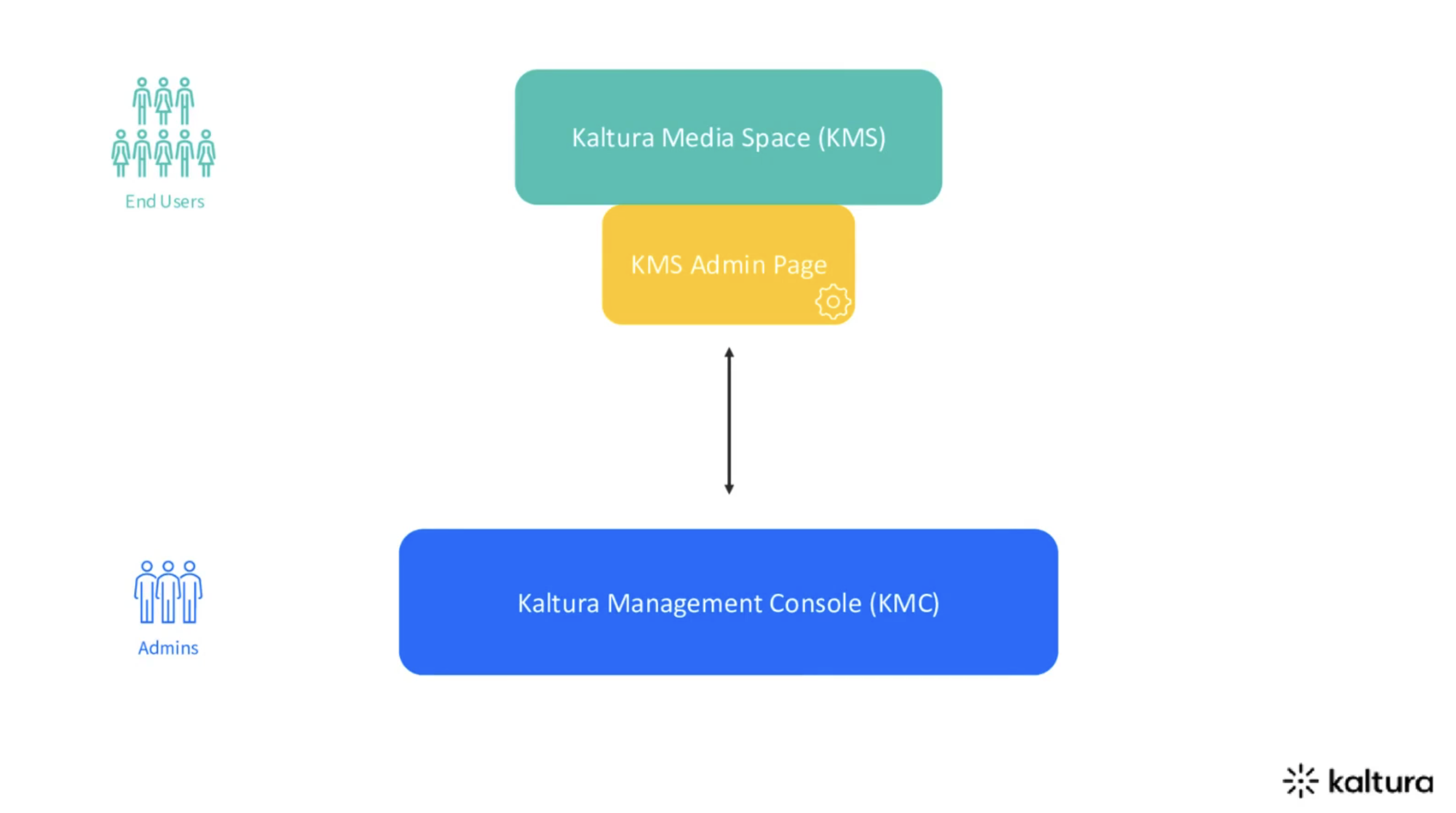
via Kaltura
Furthermore, this complexity is mirrored in Kaltura’s video player. It is essentially a hyper-customisable blank canvas that IT teams must configure via the Kaltura Player Studio (yes, yet another tool to master!). To get a functional player, administrators must tick and configure dozens of plugins (one for subtitles, one for the share button, one for quality, one for analytics...). Sometimes, they even have to manipulate what they call "UIVars" (User Interface Variables)—meaning inserting lines of code in key/value formats to force the player's visual behaviour.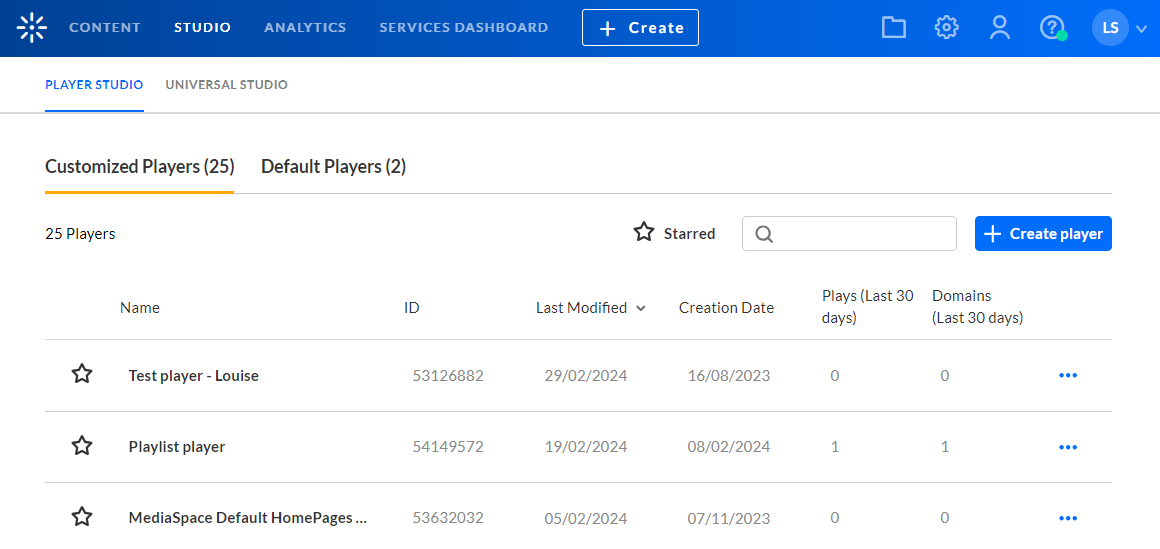
via Kaltura
🧐 The verdict: Kaltura is a highly powerful tool from a technical perspective, custom-built for global communications and large-scale institutional events. However, for day-to-day teaching, its heavy administrative overhead and financial cost (amongst the highest on the market) risk deterring pedagogical teams. By the way, if this technical complexity or heavy price tag is holding you back, be sure to check out our breakdown of the 5 alternatives to Kaltura for video learning in 2026.
2. Panopto: the tool for mass archiving
Panopto has made a name for itself by positioning its platform as a genuine Video Content Management System (VCMS), initially designed to meet the administrative requirements of large North American universities.
✨ The key advantage: Panopto excels at consolidating institutional content. The platform automatically ingests videoconference streams across the campus (Zoom, Teams, Webex) to structure them into a strict hierarchical folder system. The tool also offers granular management of permissions and access rights. It is a relevant solution for IT departments looking for an Electronic Document Management (EDM) approach applied to video, designed to centralise and categorise archives at scale.
📉 The friction point: This large-scale archiving logic heavily influences the user experience. Panopto’s interface remains primarily designed as an institutional video repository: sober, robust, and efficient for storing thousands of hours of content, but less geared towards pedagogical engagement.
The video player also suffers from an aesthetic and ergonomics that look somewhat dated compared to current web standards and modern video platforms. The screen layout, visual hierarchy, and the side-by-side presentation of video and slides can give the impression of a technical tool built more for content administration than providing a seamless, immersive viewing experience. Consequently, the learning experience can feel linear and passive, akin to browsing audiovisual archives, whereas other platforms seek to transform lectures into highly interactive and navigable learning resources.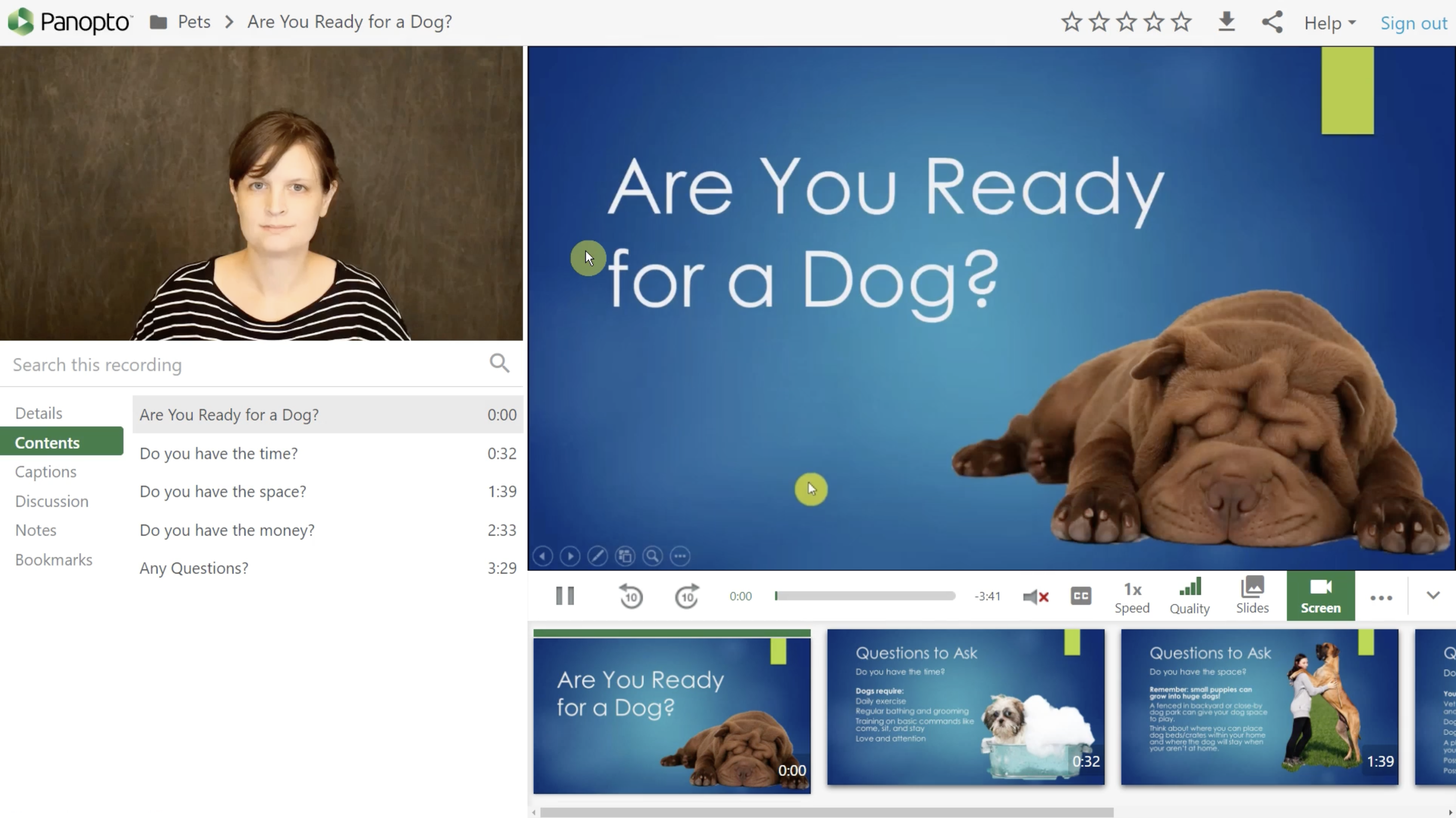
via Panopto
Finally, the recent integration of generative AI features—particularly around pedagogical avatars—also illustrates certain limitations of their current approach. While these tools align with a logic of rapid, industrialised content production, the rendering remains quite artificial and standardised. The avatars often have a corporate or demonstrative feel, far removed from the authenticity and human presence typically sought after in educational contexts. Once again, priority seems to be placed on production scalability rather than the perceived quality of the learning experience.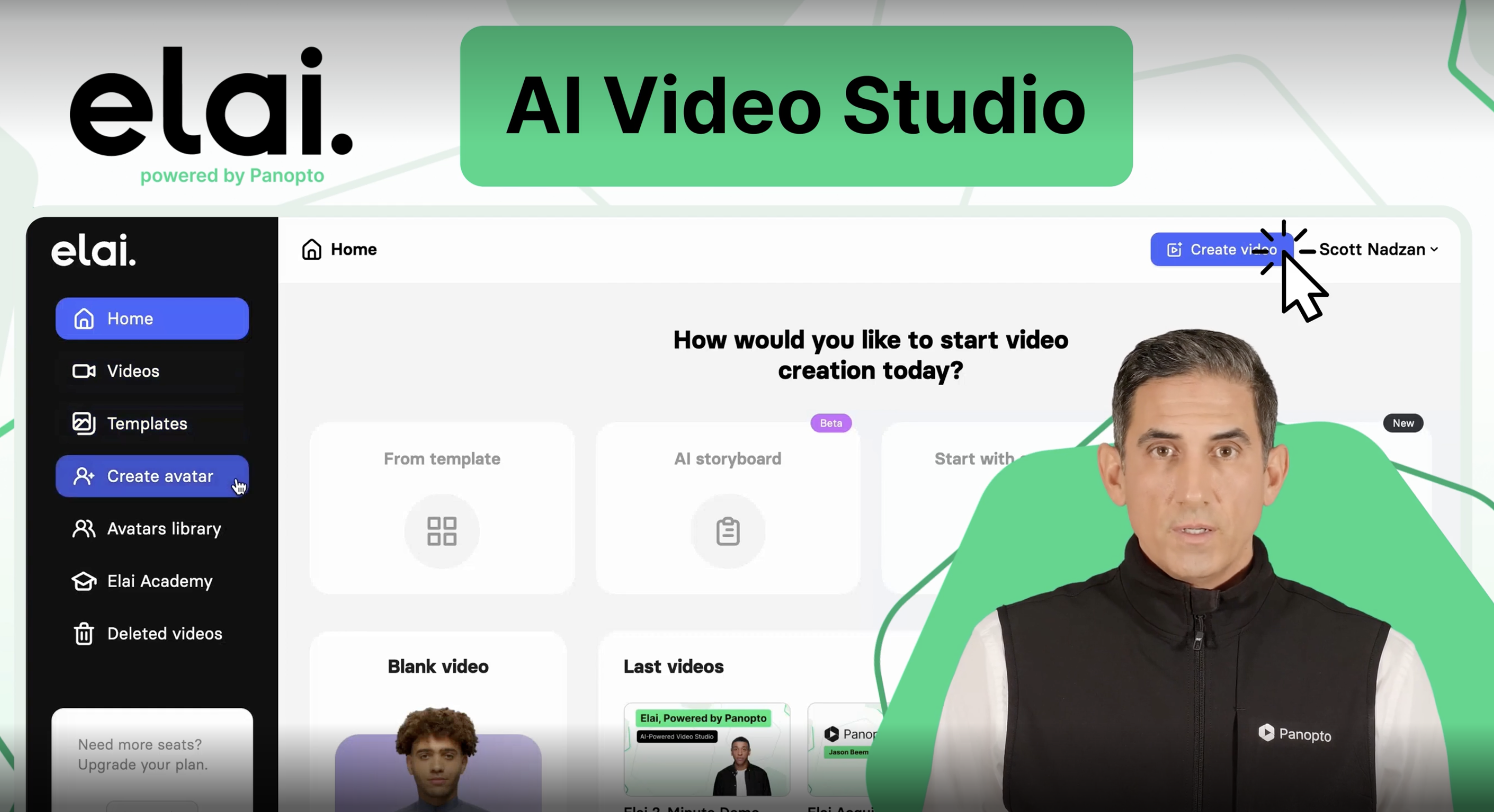
via Panopto
🧐 The verdict: Panopto stands out as a first-class storage and governance infrastructure, custom-built for IT departments looking to massively centralise and secure campus archives. However, its ageing ergonomics and highly industrialised approach to video (even within its AI avatars) turn it into a passive viewing environment. If your institution's priority is to deliver a modern, authentic learning experience focused on student interaction, the platform may feel out of step with your pedagogical ambitions.
3. Mediasite: the hardware-first pioneer
Mediasite has long been a historical pillar in higher education, built originally to solve a very specific logistical challenge: the automated, large-scale recording of university lecture halls.
✨ The key advantage: An unmatched, fully automated hardware-to-software workflow. Mediasite is one of the rare players on the market to offer a complete, proprietary ecosystem. The company manufactures physical recording boxes (hardware appliances) that integrate seamlessly with its video management platform. For university IT departments looking to equip dozens of lecture theatres with a "set-and-forget" system, Mediasite provides remarkable technical reliability. Once the cameras are plugged in and the term’s timetable is scheduled, the platform automatically records, encodes, and publishes hundreds of hours of lectures without any human intervention. via Mediasite
📉 The friction point: However, this deep reliance on proprietary hardware has become a significant vulnerability. It locks institutions into a rigid and expensive ecosystem. Upgrading or expanding the video infrastructure often requires substantial capital expenditure (CapEx) to purchase new physical recorders, whereas modern, software-first solutions offer far more agility.
Beyond the hardware constraints, Mediasite is currently facing a major strategic identity crisis. Following its acquisition by Enghouse, the company's development roadmap has visibly pivoted towards the enterprise sector, focusing heavily on corporate communications, commercial webinars, and business training. Consequently, pedagogical innovation has taken a back seat.
This stagnation is most evident in the student experience. The Mediasite player remains firmly anchored in a traditional "dual-stream" layout (the professor’s video on one side, the slides on the other). While effective for passively re-watching a lecture, this format feels remarkably dated by 2026 standards. It fundamentally treats the student as a passive spectator rather than an active participant, lacking the modern social learning features required to stimulate genuine peer-to-peer engagement.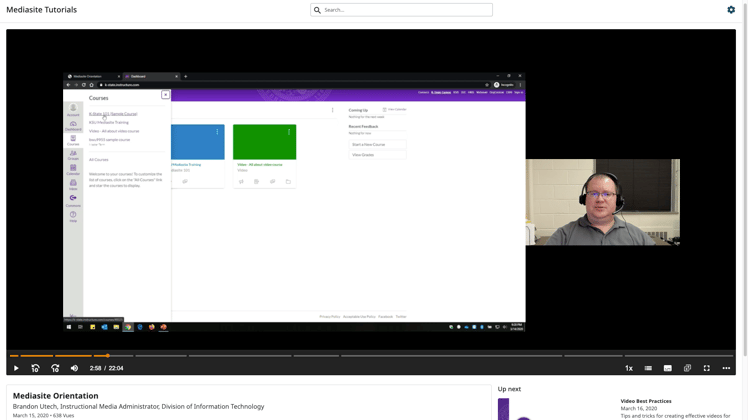
🧐 The verdict: Mediasite remains an exceptionally reliable infrastructure for IT departments whose sole priority is the automated, massive-scale recording of physical lecture theatres. However, its expensive hardware lock-in and recent strategic pivot towards the corporate market make it a risky choice for universities seeking a long-term partner fully dedicated to academic innovation and interactive digital learning.
4. YuJa: the all-in-one platform designed for maximum functional density
Over the past few years, YuJa has aggressively expanded across the North American market by pitching itself as the ultimate all-in-one educational technology suite, expanding far beyond simple video hosting.
✨ The key advantage: An astonishing density of native features. YuJa is built to tick every conceivable box on a university’s procurement tender. Within a single cloud-based ecosystem, it integrates the core YuJa Lumina Video Platform alongside a massive suite of peripheral tools: the YuJa Panorama LMS Accessibility Platform, the YuJa Verity Test Proctoring Platform, and the YuJa EqualGround Accessibility Governance Platform. For administrators and IT buyers looking to consolidate their software contracts and manage a wide array of digital media and compliance tools from a single vendor, YuJa offers an undeniably powerful and aggressive bundling strategy.
📉 The friction point: While Kaltura’s complexity (mentioned earlier) primarily affects IT administrators dealing with fragmented back-end servers, YuJa creates a very different kind of problem: front-end "feature bloat" that directly impacts the teacher's cognitive load.
Because YuJa is designed as an enterprise-grade suite aimed at institutional buyers, its core video module (Lumina) inherits a highly complex, administrative DNA. The platform suffers from a dense interface packed with advanced settings, intricate folder structures, complex permission rules, and extensive metadata fields.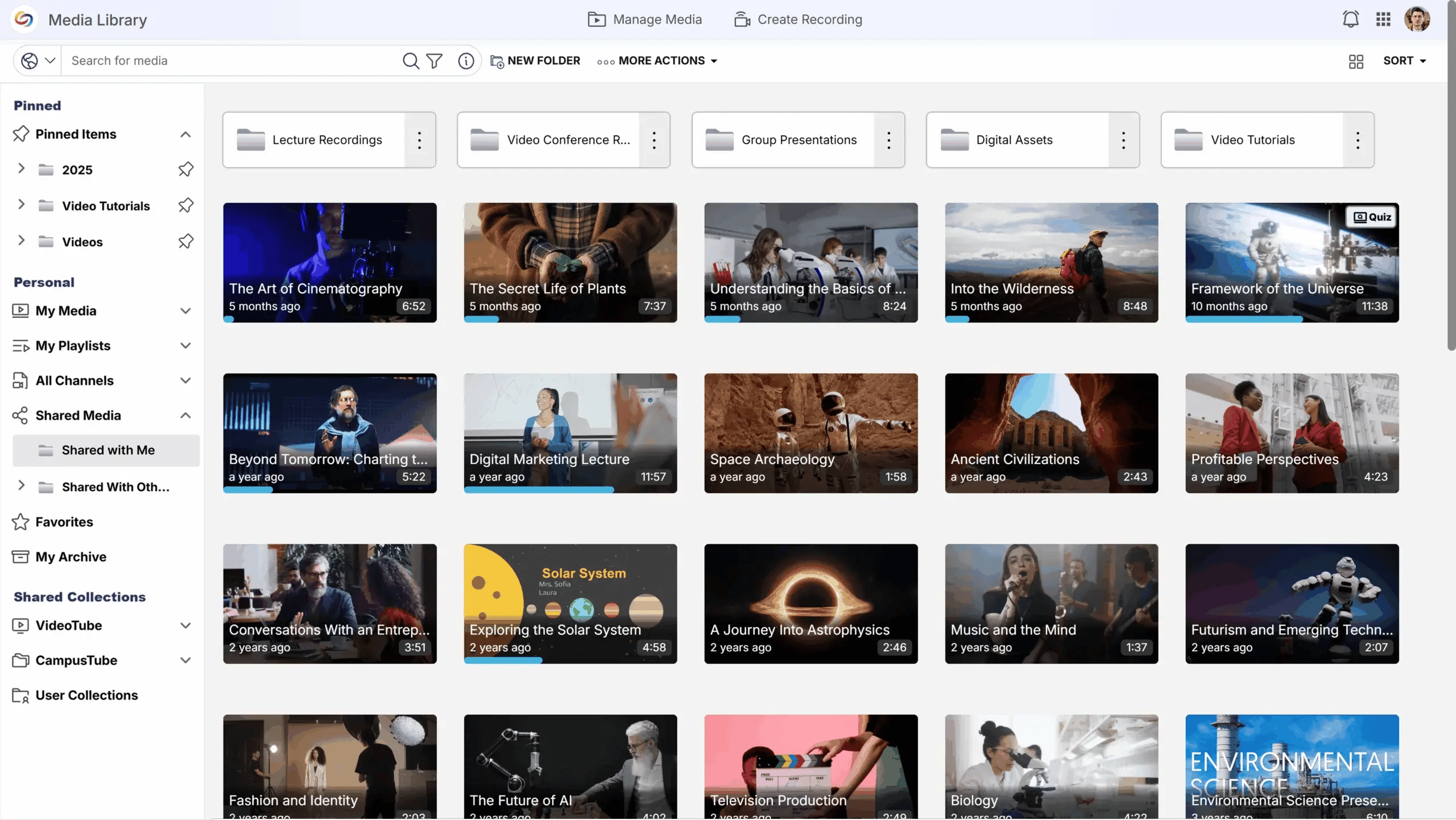
via YuJa
Independent B2B software reviews frequently highlight this "steep learning curve". For the average academic whose primary goal is simply to record a short flipped-classroom video or trim a lecture, navigating this dense media library is a major deterrent. Instead of a streamlined pedagogical workflow, educators are faced with an interface designed for power users and IT managers. This steep learning curve often transforms a simple teaching tool into an administrative burden, creating friction that can discourage less tech-savvy faculty from adopting the platform.
🧐 The verdict: YuJa is an impressive "Swiss Army knife" for institutional buyers wanting maximum features bundled into a single procurement contract. Yet, this functional density comes at the severe cost of user experience. If your institution's digital learning strategy relies on widespread faculty adoption and frictionless ease of use, YuJa’s cluttered, enterprise-first interface risks alienating the very educators it is supposed to empower.
5. YouTube: the promotional showcase at the expense of the learning environment
Used by default by many educators seeking simplicity, Google's platform is the ultimate consumer reflex for hosting videos quickly and free of charge.
✨ The key advantage: Universal accessibility and technical robustness. YouTube offers an unparalleled video infrastructure: immediate encoding, flawless adaptive quality on any device, and a high-performing automated subtitling tool. It is the perfect springboard for institutional outreach! Its free model and familiar interface make it an attractive dissemination solution for non-confidential content.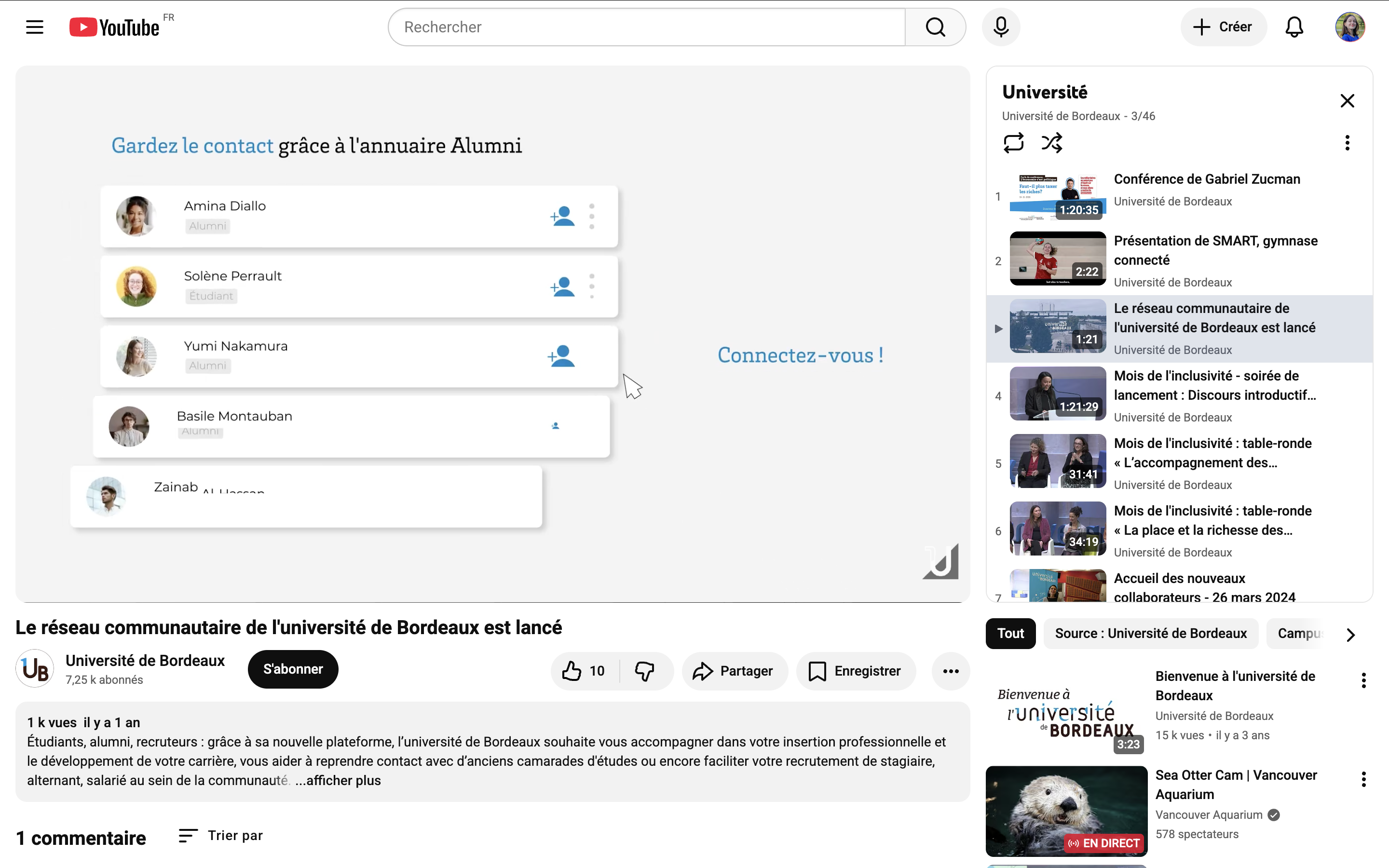
📉 The friction point: YouTube's business model is fundamentally incompatible with a focused and secure learning environment.
Firstly, the platform is engineered for the attention economy and ad retention. A student watching a lecture finds themselves immediately surrounded by adverts (sometimes right in the middle of the video) and algorithmic recommendations for entertainment videos. This overload of external stimuli disrupts concentration and fosters distraction, the exact opposite of a controlled pedagogical space.
Secondly, YouTube bypasses institutional learning design entirely. Without LTI compliance, it is technically impossible to deeply integrate the video into an LMS like Moodle or Canvas. Educators are left flying blind: they receive no reliable learning analytics (who watched the video? how far did they get?) and cannot embed quizzes that sync back to the gradebook.
Finally, entrusting lectures to YouTube raises major sovereignty and intellectual property issues. By uploading their content, teachers accept Google’s terms of service, granting the company a vast, worldwide, royalty-free licence. Professors lose exclusive control over their work, which can be monetised by the platform or used to train artificial intelligence models. Compounding this intellectual property exploitation is the collection of student data for targeted advertising, raising obvious GDPR compliance concerns.
🧐 The verdict: YouTube is a golden communications showcase for promoting the university externally and sharing "open knowledge" (such as public lectures). However, when it comes to delivering a degree-awarding curriculum, its distracting advertising model, lack of LMS integration, and the surrender of intellectual property control make it entirely unsuited to the requirements of higher education.
6. UbiCast: the expert in active pedagogy and social learning
While market standards often privilege simple individual viewing and top-down content delivery, UbiCast has built its solution around a core conviction: to engage today's students, video must stop being a content format they passively consume and instead become a space where they collaborate.
✨ The key advantage: Transforming video into a collaborative space! UbiCast disrupts the passive archive model through its interface centred on social learning. The interactive player, remarkably sleek and modern, enables students to post timestamped questions directly onto the playback bar, reply to their peers, and validate their understanding through embedded quizzes. On the teacher's side, the LTI integration is seamless: via native plugins for Moodle or Canvas, for instance, professors can add their video directly from their text editor without being redirected to a complex portal. Finally, a significant benefit for IT departments: the solution is delivered as a SaaS model with 100% sovereign European hosting (GDPR-compliant), combining the security of an institutional tool with the low maintenance overhead of a managed service..png?width=748&height=421&name=Capture%20d%E2%80%99%C3%A9cran%202026-06-25%20%C3%A0%2010.40.37%20(2).png)
via UbiCast
📉 The friction point: The flip side of this interactive richness lies in the demands the tool places on faculty members. UbiCast is not a mere passive storage repository. To truly leverage the platform (quizzes, comment moderation, dynamic chaptering), a genuine learning design approach is required. If an institution's objective is strictly limited to raw lecture capture (recording a 3-hour lecture and storing it without any further input from the professor), the platform will be underutilised. Deploying UbiCast therefore requires real change management and support from learning designers to encourage educators to rethink how they script their content.
🧐 The verdict: UbiCast establishes itself as the go-to solution for institutions wishing to move away from "soporific" video and restore an active role to the student. By fully embracing its 100% academic positioning, the platform offers the best compromise between pedagogical innovation, data sovereignty, and LMS integration. However, its successful adoption does not rely solely on technology: it demands an institutional commitment to guiding professors toward new collaborative teaching practices.


-2.png)

