
 by:Jeanne Aimerie on: February 27, 2026
For a long time, Kaltura was the go-to video solution for higher education. However, over the past few years, the American platform has taken a significant strategic turn. By repositioning itself toward the corporate and events sectors, the platform has rolled out heavily marketing-oriented features, gradually transforming into a solution optimised for webinars and lead generation rather than the classroom. While this direction perfectly meets the needs of enterprise companies, it now feels less aligned with the purely pedagogical challenges faced by universities.
Faced with this reality, and to help you choose the most relevant tool for your teachers and students, we have compared the five most discussed alternatives to Kaltura.
Overview of Kaltura alternatives
| Alternative | Best for... 🏆 | Flagship Feature 🌟 | Free Trial? 🆓 |
| UbiCast | Social Learning & data sovereignty | Interactive video player | Yes (no-obligation free trial) |
| Panopto | Large-scale management (volume & archiving) | AI automated video generation tool | Yes ("Basic" plan limited to individual use) |
| Opencast | IT Experts & Open Source philosophy | Open Source (free & modifiable code) | Free to download |
| Microsoft | Office suite & file storage | Teams integration (easy recording) | Included (with Microsoft 365 license) |
| Vimeo | Video marketing & communication | Player quality (aesthetics & 8K) | Yes (limited "Starter" version) |
Why look for a Kaltura alternative?
If the platform is still powerful, why are so many institutions questioning their choice of video solution in 2026? The answer comes down to three major pain points that highlight a disconnect between Kaltura's offering and the actual needs of the educational field.
➡️ A strategic pivot towards "Corporate" and events: As mentioned in the intro, this is the main pain point. Since the remote learning boom, Kaltura has heavily invested in its "Virtual Events" and "Town Halls" solutions, aimed at large multinationals for their marketing conferences. The platform's innovation is now focused on lead generation, marketing analytics, and event experiences. For a university, this means paying for unnecessary features, while pure educational tools (the ones used by teachers and students daily) evolve much slower. The platform is becoming a communication tool first and a learning tool second.
➡️ The overwhelming complexity: Kaltura’s historical strength (its vast array of features) has become its Achilles' heel. The interface is often considered dense, complex, and intimidating for an instructor who "just" wants to share a lecture or create a quick quiz. Where 2026 web standards prioritise simplicity and immediacy, Kaltura still requires significant onboarding and configuration time.
➡️ The cost-to-support ratio: Maintaining a Kaltura instance requires resources, either financial or human (to configure the many distinct tools within the overarching solution). For many institutions, the ROI just isn't there anymore compared to more agile solutions that focus on user experience and offer customer support more attuned to the realities of higher education.
The 5 Best Kaltura Alternatives in 2026
1. UbiCast: The pro-pedagogy, sovereign player
As the European leader in video learning, UbiCast is a French solution that stands out from standard video hosting platforms thanks to a DNA deeply rooted in higher education and training. Far more than just a video management platform, it’s a sovereign "social learning" tool that transforms passive video consumption into an active learning experience via its Nudgis video platform, all while guaranteeing flawless data security.
.png?width=748&height=467&name=Nudgis%20by%20UbiCast_article%20(1).png)
UbiCast's Strengths ✅
➡️ Pedagogical enrichment and "Social Learning" experience: With Nudgis, UbiCast’s video platform, the learning experience is interactive. Teachers enrich videos using the engaging sidebar with time-based annotations, chapters, quizzes, polls, and attachments, while students can comment, ask questions, and test their knowledge to review course material at their own pace.
➡️ Multi-stream management: With UbiCast, you can simultaneously record multiple streams (e.g., webcam + screen capture). The video player then allows students to choose their preferred view, switch to full screen, or watch both side-by-side for a seamless viewing experience.
➡️ Sovereignty and security: A major selling point in 2026, the solution is 100% GDPR compliant, with guaranteed data hosting in France.
➡️ Premium service and support: Exceptionally high customer satisfaction (100% in 2025 across nearly 300 requests) with unlimited, multi-channel support (phone, video call, email).
➡️ User-driven innovation: The product roadmap is directly influenced by users via the "Community" space, ensuring the tool meets real, on-the-ground needs.
➡️ Technical integration: A seamless SaaS approach with native integration into the market's leading LMSs (Moodle, Brightspace, Canvas, Blackboard, etc.).
UbiCast's Weaknesses ❌
➡️ No advanced post-production: The editor focuses on the essentials, mainly allowing you to trim the beginning and end or cut out segments. It doesn't replace editing software (like Adobe Premiere) and doesn't support complex dynamic editing, sophisticated special effects, or deep audio processing directly within the browser.
➡️ Admin learning curve: The platform's rich feature set (such as granular rights management) can be intimidating for administrators or less tech-savvy instructors at first glance.
UbiCast is the best alternative if... 🔍
➡️ Data sovereignty is critical to you: You are looking for a credible European alternative to American tech giants, ensuring hosting in Europe and native GDPR compliance with no gray areas.
➡️ Interactivity is more important than passive watching: Your goal isn't just to store videos, but to create a "Social Learning" experience where students react, take quizzes, and annotate content.
➡️ You want a close relationship with your provider: You value accessible customer support (real humans available via phone and video) and the ability to genuinely influence future updates through an active community. In short, a solution built by and for its users!
2. Panopto: The American standard on AWS
Often considered Kaltura’s main global rival, Panopto is an industry giant hosted on Amazon Web Services (AWS) infrastructure. It is a robust solution that goes all-in on its ability to handle massive volumes of video. It acts as a true internal "archive library": rather than focusing on social interaction, its primary goal is to automate the capture and storage of thousands of hours of lectures (and Zoom/Teams recordings) to turn its platform into the institution's internal 'Google'.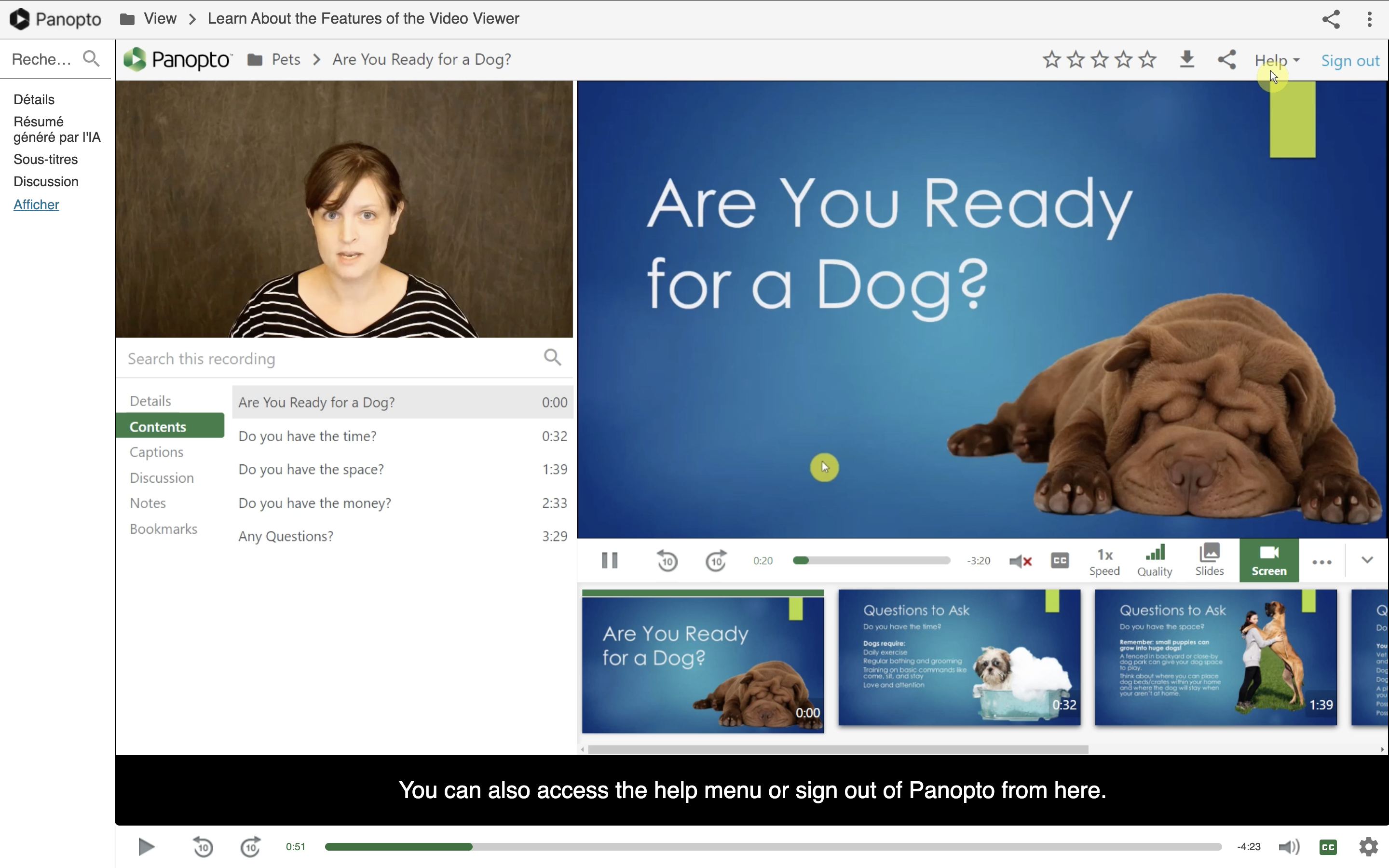
via Panopto
Panopto's Strengths ✅
➡️ Feature richness: Panopto is a "powerhouse" covering a wide spectrum of educational and technical needs, making the platform highly versatile.
➡️ Seamless LMS integration: The solution integrates solidly into digital learning environments (Moodle, Canvas, Blackboard, etc.), making course delivery easier.
➡️ AI innovation (content generation): Panopto has embraced the artificial intelligence shift by offering automated content creation tools, showing a willingness to innovate quickly on tech trends.
Panopto's Weaknesses ❌
➡️ Tiered technical support: Customer service accessibility is limited on standard plans. To get a responsive and comprehensive service level, you often have to upgrade to higher (paid) licence tiers.
➡️ Questionable AI strategy: While the tool can generate content, the quality lags behind industry specialists (like Synthesia). Furthermore, the approach seems aimed at replacing the instructor with AI rather than "augmenting" them, which can hinder pedagogical adoption.
➡️ Lack of graphic flexibility: Customisation of the homepage and interfaces remains limited, making it difficult to strictly apply the institution's brand identity.
➡️ User constraints: User database management can prove restrictive depending on the specific licences purchased.
Panopto is the best alternative if... 🔍
➡️ Digital sovereignty is not a criterion: Hosting on AWS (a US cloud) and being subject to the Cloud Act are not dealbreakers for your university.
➡️ You value power over proximity: You need a globally proven solution and have an internal tech team capable of managing the tool without relying on limited support.
➡️ You have a flexible budget: You can absorb high license costs and potential billing adjustments.
3. Opencast: The Open Source gamble
Opencast is the gold standard in the free software world, spearheaded by a community of international universities. Here, there is no vendor, no license, just open code that the institution must adopt and adapt. While the promise of free software looks appealing on paper, the technical reality makes it a solution reserved for institutions with substantial IT resources.
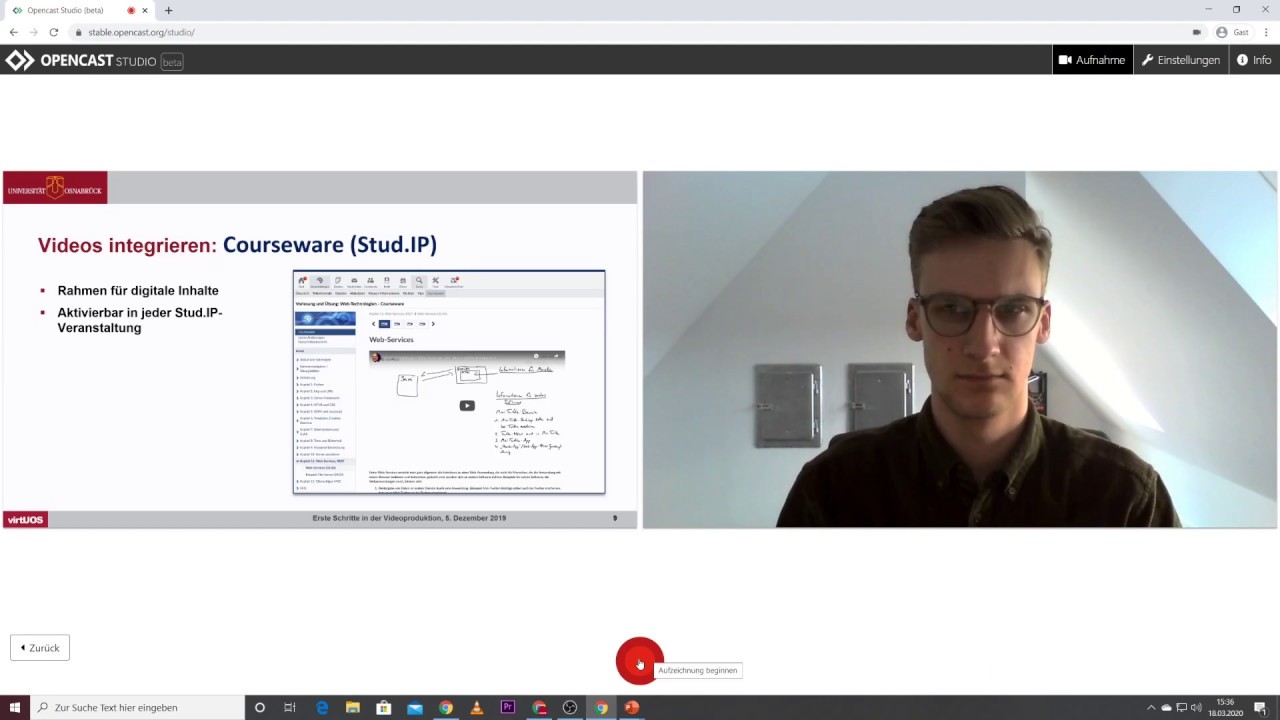
via Opencast
Opencast's Strengths ✅
➡️ Freedom and free licensing: As an Open Source project, there are no software purchase or subscription fees. It's direct savings on the investment budget.
➡️ Total GDPR compliance: Since you host the solution yourself (On-Premise), you have absolute control over your data and its location, without relying on a third party.
➡️ Community philosophy: Ideal for institutions that advocate for free software and reject "Vendor Lock-in" (dependence on a private provider).
Opencast's Weaknesses ❌
➡️ The hidden cost of hosting: The provider doesn't offer a "turnkey" SaaS model. This means server and infrastructure costs fall entirely on the institution, often running higher than a shared cloud subscription.
➡️ Complex "patchwork" architecture: The solution isn't a unified whole, but rather a collection of modules and building blocks that must be installed and configured on a case-by-case basis. Few features are native, requiring constant integration efforts.
➡️ Time-consuming and risky maintenance: Updates are cumbersome to deploy. The lack of customer support means every technical issue must be resolved in-house or via community forums.
➡️ Skyrocketing human costs: This is the major drawback. Licensing savings are often canceled out, or even exceeded, by the human cost of the engineers required to maintain, develop, and keep the machine running daily.
➡️ Spartan user experience: The interface is functional but austere, with almost non-existent graphic customisation.
Opencast is the best alternative if... 🔍
➡️ You have an oversized IT department: You have a robust internal tech team (developers, sysadmins) capable of handling managed services and continuous development.
➡️ Open Source is a prerequisite: Your institution mandates the exclusive use of Open Source software, regardless of the human cost or technical complexity.
➡️ You want to build your own tool: You need to deeply modify the source code to create a custom-tailored solution that isn't available on the market.
4. SharePoint + Clipchamp: The Microsoft Office suite
Since the permanent shutdown of the "Stream Classic" portal in February 2024, Microsoft no longer offers a dedicated video platform (VCMS) per se. Video has become just another file, stored directly in SharePoint or OneDrive. While Teams integration remains strong for recording, the experience is now fragmented, with editing offloaded to the consumer-focused tool, Clipchamp.
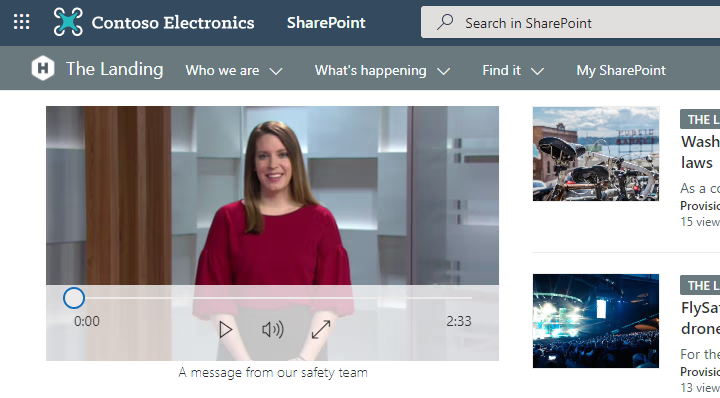 via Microsoft
Microsoft SharePoint & Clipchamp's Strengths ✅
➡️ The Teams ecosystem: The ultimate virtual classroom tool. Recording is native, and the file lands immediately in the team's storage space.
➡️ Immediate accessibility (SSO): No new platform to deploy; everything is integrated into the student's and teacher's Office 365 digital identity.
➡️ Consumer editing (Clipchamp): The acquisition of Clipchamp provides a modern, simple web-based editing interface for quick cuts, though it's designed more for social media content creators (TikTok/Instagram) than for university lectures.
Microsoft SharePoint & Clipchamp's Weaknesses ❌
➡️ Disappearance of the video portal: Since 2024, there is no longer a centralised "Corporate YouTube." Videos are scattered across SharePoint folders, making it nearly impossible to build a cohesive educational video library.
➡️ Storage costs (SharePoint): This is the trap! Video files are heavy, and SharePoint storage is very expensive per additional gigabyte. The bill can quickly skyrocket compared to a dedicated video platform with unlimited storage.
➡️ Lack of educational features: Microsoft has stopped investing in video learning features (no smart chaptering, built-in quizzes, or granular student engagement analytics).
➡️ No LMS integration (LTI): Without a true video platform, integration with Moodle or Canvas has become archaic (sharing raw links), breaking the flow of the learning journey.
➡️ Strategic blur: Video is no longer a priority. It's treated as a standard office commodity, lacking a vision for higher education.
Microsoft SharePoint & Clipchamp is the best alternative if... 🔍
➡️ You don't have a video strategy: Video is an anecdotal use case for you (meetings, quick messages) rather than a pillar of your pedagogy.
➡️ You want to reduce your tool stack at all costs: You prefer to sacrifice user experience and educational features to avoid managing another vendor contract.
➡️ Your needs are "administrative": You treat video like cold file archiving, with no real expectations for interactivity or searchability.
5. Vimeo: The aesthetic showcase
Historically favoured by creatives for its high-quality player, Vimeo remains a benchmark for broadcasting beautiful videos. However, for higher education, the tool quickly shows its limitations. It's an excellent broadcasting platform, but not a learning platform. Moreover, its recent acquisition casts doubt on its future: the strategy seems to be pivoting even further away from the education sector to focus on marketing and enterprise.
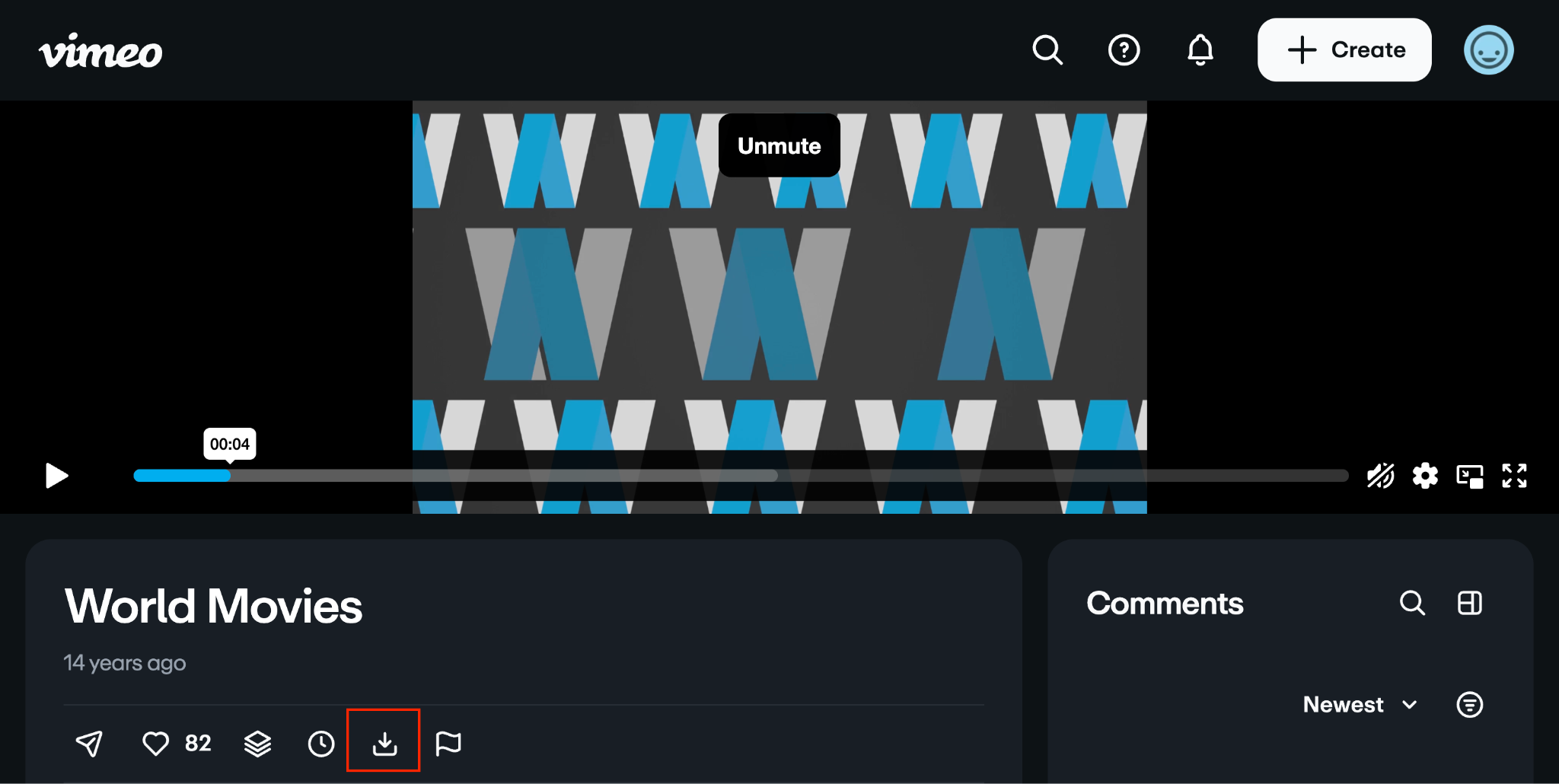 via Vimeo
Vimeo's Strengths ✅
➡️ Flawless playback quality: This is Vimeo's historical strength. The player is aesthetically pleasing and perfectly handles 8K and adaptive streaming. For an art or film school, this is a major asset!
➡️ Ease of use: The interface is sleek. You upload, share a link, or embed the video on a webpage. It's the ultimate "zero training required" tool.
➡️ Accessible pricing: Compared to the hefty prices charged by Kaltura or Panopto, Vimeo's plans are often more transparent and affordable for basic storage needs.
Vimeo's Weaknesses ❌
➡️ The educational void: It's a video player, period. There is no smart chaptering, no in-content search (OCR/ASR), no synchronised note-taking, and no interactive quizzes to validate learning. Just "Play & Pause," and that's it!
➡️ Lack of LMS integration: Vimeo does not natively and bi-directionally integrate with the LMS platforms used by universities.
➡️ Strategic uncertainty: Vimeo's recent acquisition is a red flag. Roadmaps are frozen or redirected, and there's no guarantee that current pricing or features will be maintained for customers.
➡️ Data sovereignty: Vimeo is an American player subject to the Cloud Act, with servers predominantly located across the Atlantic.
Vimeo is the best alternative if... 🔍
➡️ Your needs are marketing-driven rather than educational: You want to broadcast promotional school videos or public lectures on your showcase website.
➡️ You don't need LMS integration: Manually copying and pasting links or embed codes into your Moodle or Canvas courses doesn't bother you, and you don't expect the video platform to communicate with the gradebook.
➡️ You have a very tight budget... and are looking for a reliable hosting solution without the advanced features of a VCMS (Video Content Management System).
Verdict: Which Kaltura alternative for video learning in 2026?
When it comes down to it, the video platform landscape has radically changed. While Microsoft and Vimeo remain handy backup solutions for file storage or showcase communication, they no longer meet the demands of a structured educational strategy. Opencast, meanwhile, requires technical resources that few institutions can afford to dedicate long-term.
The final choice often boils down to a clash of philosophies between the industrial American approach and the educational European approach:
➡️ On one side, Panopto embodies the power of "Big Data": a massive archive library hosted on the US cloud, designed for mass indexing and automation.
➡️ On the other side, UbiCast embodies proximity and learning: a sovereign solution, hosted in France, that puts humans back at the center through Social Learning.
Why UbiCast is the best alternative to Kaltura
In 2026, at a time when data protection (GDPR) has become a critical issue and artificial intelligence sometimes attempts to replace the instructor, UbiCast takes the opposite bet: augmenting the teacher rather than replacing him.
With its Nudgis platform, UbiCast doesn't just store knowledge; it brings it to life, making it interactive and community-driven. For universities looking to combine legal security, educational richness, and human-centric support, UbiCast stands out today as the most coherent and sustainable alternative.


-2.png)

